Approx. read time: 7.1 min.
Post: The Essentials of Alice (Bunny) Tutorial
The Essentials Of Alice (Bunny) Tutorial
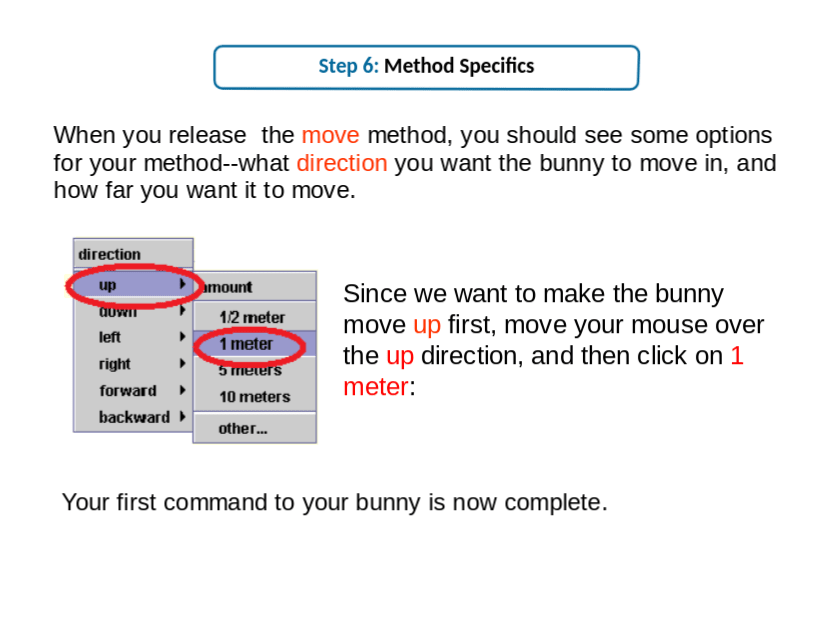
Step 6: Method Specifics
When you release the move method, you should see some options for your method–what direction you want the bunny to move in, and how far you want it to move.
Since we want to make the bunny move up first, move your mouse over the up direction, and then click on 1 meter:
Your first command to your bunny is now complete.
Related Posts





The Longevity Blueprint: AI-Powered Health Optimization
Current step:1AI-Human Medical Analyzer: Smarter, Personalized Health
2AI-Human Medical Analyzer: Smarter, Personalized Health
About the Author: Bernard Aybout (Virii8)

I am a dedicated technology enthusiast with over 45 years of life experience, passionate about computers, AI, emerging technologies, and their real-world impact. As the founder of my personal blog, MiltonMarketing.com, I explore how AI, health tech, engineering, finance, and other advanced fields leverage innovation—not as a replacement for human expertise, but as a tool to enhance it. My focus is on bridging the gap between cutting-edge technology and practical applications, ensuring ethical, responsible, and transformative use across industries.
MiltonMarketing.com is more than just a tech blog—it's a growing platform for expert insights. We welcome qualified writers and industry professionals from IT, AI, healthcare, engineering, HVAC, automotive, finance, and beyond to contribute their knowledge. If you have expertise to share in how AI and technology shape industries while complementing human skills, join us in driving meaningful conversations about the future of innovation. 🚀