Approx. read time: 3 min.
Post: Introduction to the Unity Editor
Introduction to the Unity Editor
The Unity Editor is a powerful tool for creating 2D and 3D games, as well as interactive content. Its default layout is designed to provide easy access to the most important features, facilitating the creation and testing of projects. In this guide, we’ll explore the Unity Editor’s interface and key areas, helping beginners navigate and utilize its capabilities effectively.
Unity Editor Interface: A Quick Overview
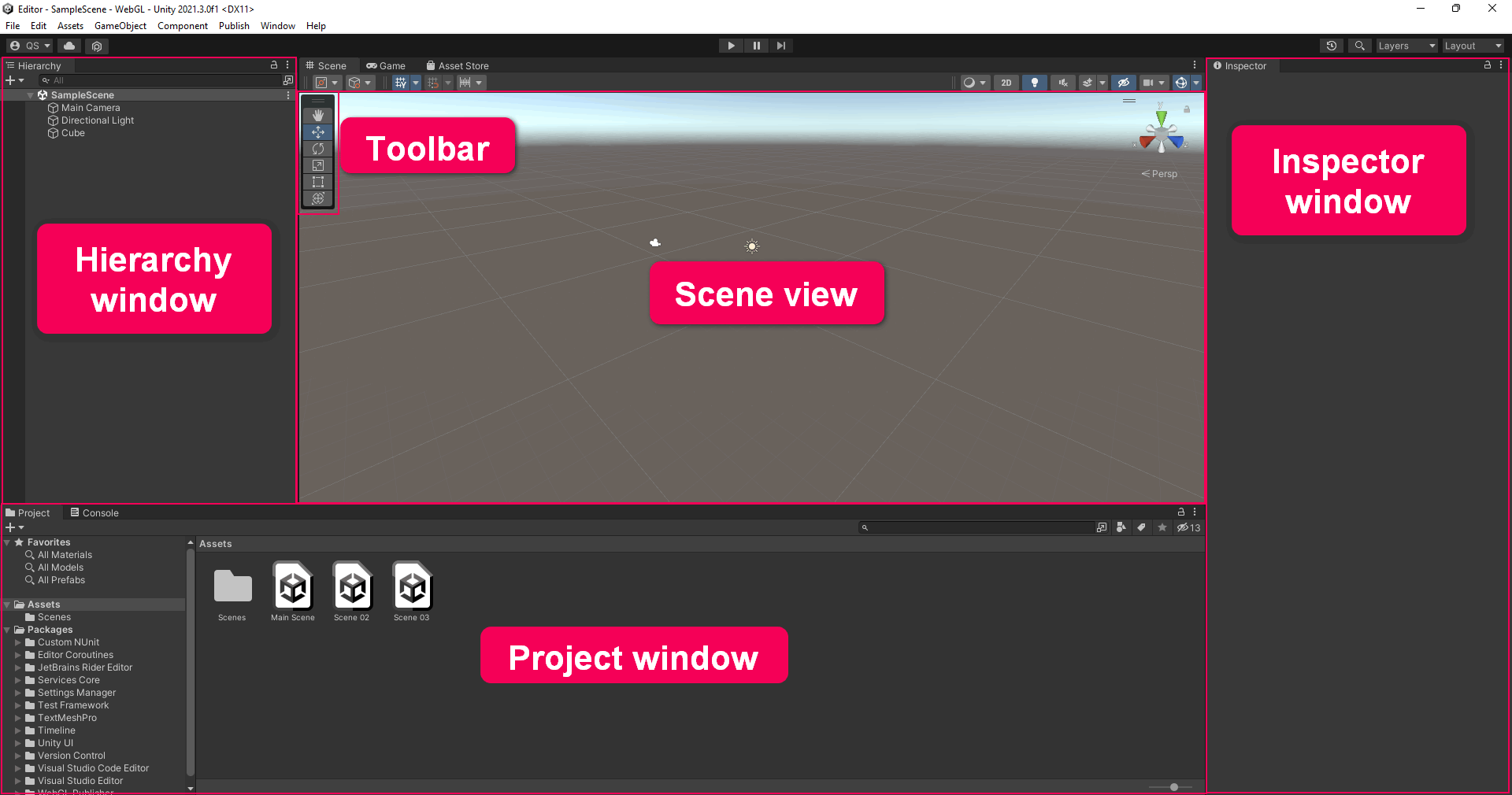
The Unity Editor interface is divided into five main areas:
- Scene View and Game View: At the heart of the Unity Editor is the Scene view, an interactive window where you can design your game world and place objects. Adjacent to it is the Game view, which allows you to playtest your game from within the editor, offering a first-hand look at how your game will appear to players. (see image below for screen area.)
- Hierarchy Window: This is where all the elements in your current project are organized. Every object in your Scene view is listed here, providing a clear overview of your game’s structure. Adding or removing GameObjects in the Scene view reflects directly in the Hierarchy, ensuring a synchronized overview of your project’s components. (see image below for screen area.)
- Project Window: Think of this as your asset library. Every file you import or create within your Unity project appears here. The Project window is essentially your workspace for managing assets, including textures, scripts, and prefabs. It’s organized in a familiar folder structure, making it easy to navigate and manage your project’s resources. (see image below for screen area.)
- Inspector Window: Selections in the Scene view or Hierarchy window reveal their components in the Inspector. This window is crucial for editing the properties and settings of your GameObjects, providing control over their behavior and appearance. Each component’s adjustable parameters are displayed here, allowing for fine-tuning and customization. (see image below for screen area.)
- Toolbar: Located at the top, the toolbar contains essential tools for manipulating the scene and objects within it. Functions for moving, rotating, and scaling GameObjects are accessible here, along with options to play, pause, or step through your game, offering a quick way to test and adjust your project on the fly.
Navigating the Unity Editor
Understanding the Unity Editor’s layout is the first step toward mastering Unity. Each area of the interface is designed to streamline the development process, from conceptualizing your game world in the Scene view to adjusting GameObject properties in the Inspector.
The toolbar at the top provides quick access to commonly used tools, enhancing your workflow and making it easier to switch between different tasks. For instance, toggling between the Scene and Game views can be done effortlessly, allowing you to edit your project and test gameplay without leaving the editor.
Conclusion
The Unity Editor is a robust platform for game development, offering a wide array of tools and features to bring your creative visions to life. By familiarizing yourself with the interface and its main windows, you can navigate the editor with confidence and efficiency. Whether you’re a seasoned developer or just starting out, understanding the layout and functionality of the Unity Editor is essential for creating interactive content and immersive gaming experiences.
Introduction to the Unity Editor
Introduction to the Unity Editor
Unity3d Editor Tutorial – Installing the Unity Editor and adding platform components
Related Videos:

Related Posts:
Unity User Manual 2022.3 (LTS)
Project T-Dot At Billy Bishop Toronto City Airport
Unity Ballistic Trajectory Simulation Guide
Unity in Diversity: Celebrating Inclusive Language and Respect
Related Posts



The Longevity Blueprint: AI-Powered Health Optimization
About the Author: Bernard Aybout (Virii8)